Introduction
When you post on LinkedIn, how your message looks can be just as important as what you say. Using italics can help emphasize key parts of your message or show quotes more clearly. Even though LinkedIn doesn't let you format text directly, there's a simple way to add italics using a tool like linkedinpreview.com.
Understanding LinkedIn’s Formatting Restrictions
LinkedIn is a place for professionals to connect and share ideas, but it doesn't allow you to make words bold or italic directly in your posts. This can make it tricky when you want to highlight certain words or phrases. However, with the right tools, you can make your posts look great and stand out.
Tools for Adding Italics to LinkedIn Posts
If you want to use italics in your LinkedIn posts, you can use a website like linkedinpreview.com. This LinkedIn post formatter lets you write your post, format it with italics, and see how it will look before you share it on LinkedIn.
Step-by-Step Guide to Adding Italics Text
Here's how to add italics to your LinkedIn posts using linkedinpreview.com:
1. Access linkedinpreview.com
Open your web browser and go to linkedinpreview.com. This website offers a simple text editor that's easy to use.
2. Type or Paste Your Content
You can type your post directly into the editor on linkedinpreview.com or paste text from another document.
3. Select and Italicize Your Text
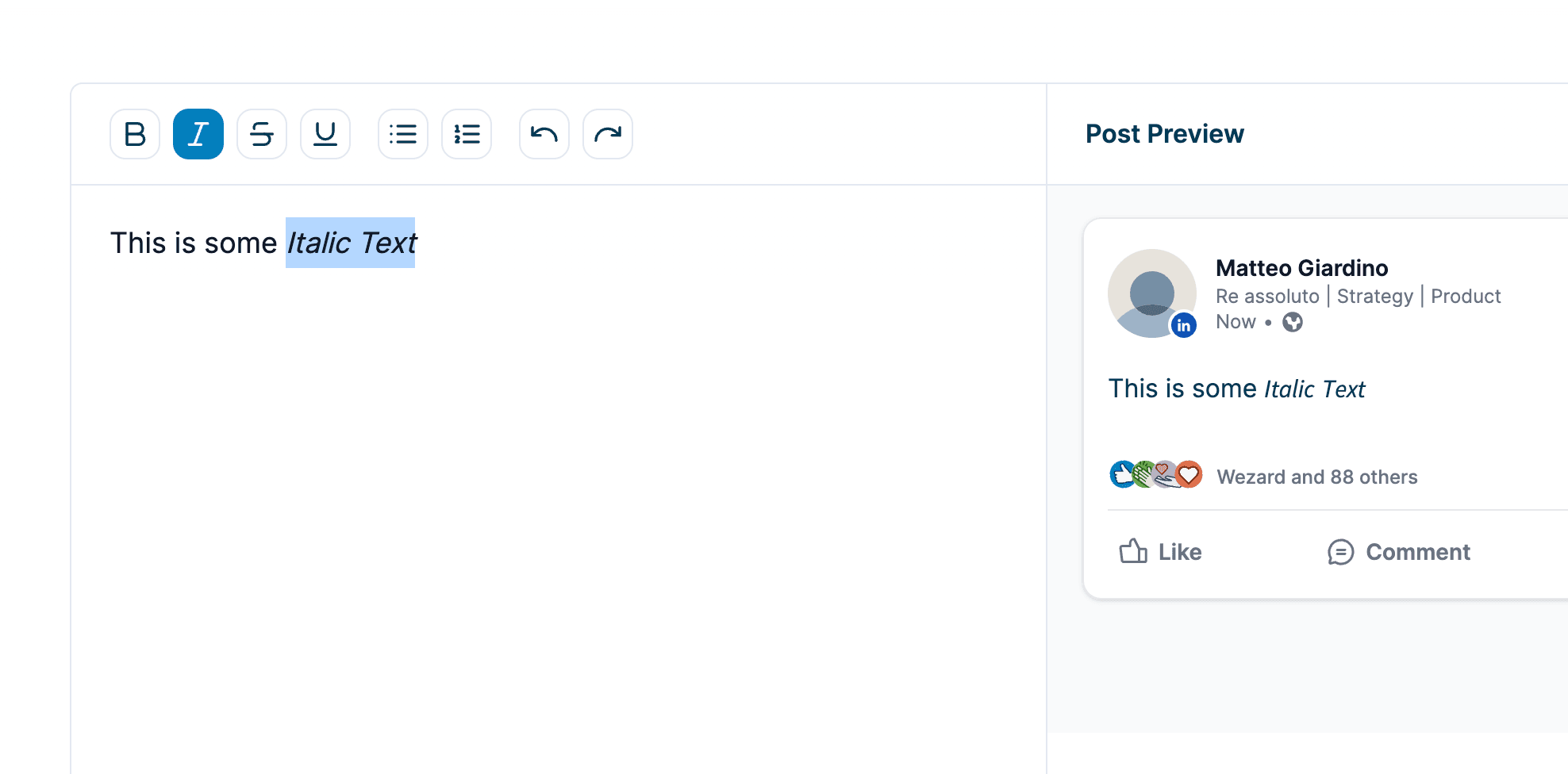
Highlight the words you want to italicize. Then, click the italics button (usually shown as an "I") in the toolbar. This will make the selected text italic.
4. Preview Your Formatted Text
After you italicize your text, you can look at the preview on linkedinpreview.com to see how it will appear on LinkedIn. This helps ensure that the italics are used correctly and that your post looks good.
Best Practices for Using Italics in LinkedIn Posts
Using italics can make your posts more engaging, but it's important to use them correctly:
When to Use Italics Effectively
- For emphasis: Make important points stand out by italicizing key words or phrases.
- For titles: Use italics for book titles, articles, or reports.
- For quotes: Italicize quotes to differentiate someone else’s words from your own.
Tips for Keeping Your Posts Professional
- Use sparingly: Too much italic text can be hard to read. Just use italics for the most important parts.
- Keep a balance: Mix italicized words with regular text to make sure your post is easy to read.
Common Mistakes to Avoid When Using Italics
- Too much emphasis: Don’t italicize too much text; it should be used just to highlight certain points.
- Wrong places: Avoid italicizing large sections that don't need special emphasis.
Examples of Effective Italics Usage in LinkedIn Posts
Here are some practical ways to use italics:
- Highlighting keywords: In a post about important business outcomes, you might italicize terms like “revenue growth” or “customer satisfaction.”
- Citing sources: When mentioning a study or article, italicize the title, like Harvard Business Review.
Conclusion
Adding italics to your LinkedIn posts can help make your messages clearer and more engaging. Although LinkedIn doesn't support text formatting directly, using a tool like linkedinpreview.com makes it easy to add professional-looking italics to your posts.
Want to make your LinkedIn posts more effective? Visit linkedinpreview.com to try adding italics and see how a little formatting can make a big difference in how people view and interact with your posts.